Fundamental of Computer & IT
Unit
- I
· The Computer System Concept.
A computer is more than a high-powered collection of
electronic devices performing a variety of information processing chores. A
computer is a system, an interrelated combination of components that performs
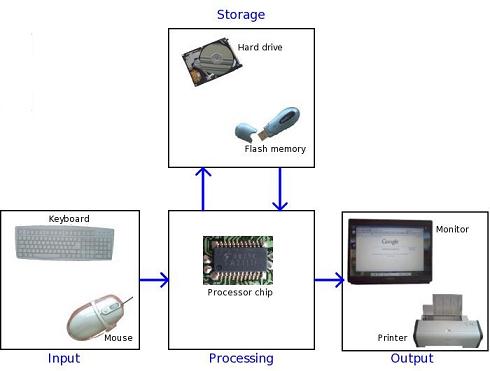
the basic system functions of input, processing, output, storage, and control,
thus providing end users with a powerful information processing tool.
Understanding the computer as a computer system is vital to the effective use
and management of computers.
A computer is system of hardware devices organized
according to the following system functions.
·
Input. The input devices of a computer system include
keyboards, touch screens, pens, electronic mice, optical scanners, and so on.
·
Processing. The central processing unit( CPU) is the main
processing component of a computer system. (In microcomputers, it is the main
microprocessor.) In particular, the electronic circuits of the arithmetic-logic
unit one of the CPU’s major components, perform the arithmetic and logic
functions required in computer processing.
·
Output. The output devices of a computer system include
video display units, printers, audio response units , and so on, They convert
electronic information produced by the computer system into human intelligible
form for presentation to end users.
·
Storage. The storage function of a computer system takes
place in the storage circuits of the computer’s primary storage unit, or
memory, and in secondary storage devices such as magnetic disk and tape units.
These devices store data and program instructions needed for processing.
·
Control. The control unit of the CPU is the control
component of a computer system. Its circuits interpret computer program
instructions and transmit directions to the other components of the computer
system.
·
Control. The control unit of the
CPU is the control component of a computer system. Its circuits interpret
computer program instructions and transmit directions to the other components
of the computer system.
·
The Central Processing Unit.
·
The central processing unit is the most
important hardware component of a computer system. It is also known as the CPU,
the central processor or instruction processor, and the main microprocessor in
a microcomputer. Conceptually, the circuitry of a CPU can be subdivided into
two major subunits the arithmetic-logic unit and the control unit. The CPU also
includes circuitry for devices such as registers and cache memory for high
–speed, temporary storage of instruction operations, input/output, and telecommunications
support.
The control unit obtains instructions from software
segments stored in the primary storage unit and interprets them. Then it
transmits electronic signals to the other components of the computer system to
perform required operations. The arithmetic-logic unit performs required
arithmetic and comparison operations .A computer can make logical changes from
one set of program instructions to another (e.g, overtime pay versus regular
pay calculations) based on the results of comparisons made in the ALU during
processing.
·
Main Memory and Primary Storage Unit.
A computer’s primary storage unit is
commonly called main memory, and holds data and program instructions between
processing steps and supplies them to the control unit and arithmetic-logic
unit during processing. Most of a computer’s memory consists of microelectronic
semiconductor memory chips known as RAM (random access memory ). The contents
of these memory chips can be instantly changed to store new data. Other, more
permanent memory chips called ROM (read only memory) may also be used.
·
Secondary storage devices like
magnetic disks and optical disks are used to store data and programs and thus
greatly enlarge the storage capacities of computer system. Also, since memory
circuits typically lose their contents when electric power is turned off, most
secondary storage media provide a more permanent type of storage. However the
contents of hard disk drives floppy disks, CD-ROM disks, and other secondary
storage media cannot be processed without first being brought into memory. Thus
secondary storage devices play a supporting role to the primary storage of a
computer system.
· What are a computer's application areas?
1. Image Processing: Object recognition, including optical
character recognition, thumb print recognition and handwriting recognition as
well as image enhancement require extremely powerful processors, but have wide
application. Many commercially interesting applications require that the
processor be small, inexpensive and portable.
2. Robotics controllers: Robot arms have 5 or 6 joints (degrees
of freedom). A typical strategy is to have a microcontroller for each joint
plus a more powerful processor for centralized control. With powerful
microcontrollers, each joint can perform complex positional calculations in
real time. In a mobile system, small size and low power consumption are vital.
3. Digital Filters: Filters require high speed
multiplications to keep up with high data flow rates. Stack processors have the
room on-chip for hardware multipliers and algorithm specific hardware to
quickly perform digital filter calculations.
4. Process Control: More powerful processors can go beyond
simple process control techniques to apply expert system technology to real
time process monitoring and control. Stack machines are particularly well
suited for rule-based systems.
5. Computer Graphics: While there are several special
purpose graphics accelerator chips on the market, these tend to concentrate on
the primitives of drawing lines and moving blocks of bits. The exciting
opportunity here is in the area of interpreting high level graphics command
languages for both laser printers and device independent screen display
languages. One of the predominant languages, Postscript, is similar to Forth.
6. Other Computer Peripherals: The low system cost of a stack machine
makes it well suited for controlling computer peripherals such as disk drives
and communication links.
7. Telecommunications: High speed controllers can provide the
capability for data compression and therefore lower transmission costs for tealeaf
and modem applications. They can also monitor the performance of transmission
equipment.
8. Automotive Control: The automotive market forces very
severe restrictions on cost and environmental requirements. In this business a
minute difference in cost per component can add up to large profits or losses.
A high level of system integration is mandatory. Computers can improve car
performance and safety even while reducing system cost in applications such as
computerized ignition, braking, fuel distribution, anti-theft devices,
collision alert systems, and dash display systems.
·
Disadvantages
of computer
The use of computer has also created some problems in society
which are as follows.
1.
Unemployment
Different tasks are performed automatically by using computers.
It reduces the need of people and increases unemployment in society.
2.
Wastage
of time and energy
Many people use computers without positive purpose. They play
games and chat for a long period of time. It causes wastage of time and energy.
Young generation is now spending more time on the social media websites like
Facebook, Twitter etc or texting their friends all night through smartphones
which is bad for both studies and their health. And it also has adverse effects
on the social life.
3.
Data
Security
The data stored on a computer can be accessed by unauthorized
persons through networks. It has created serious problems for the data
security.
4.
Computer
Crimes
People use the computer for negative activities. They hack the
credit card numbers of the people and misuse them or they can steal important
data from big organizations.
5.
Privacy
violation
The computers are used to store personal data of the people. The
privacy of a person can be violated if the personal and confidential records
are not protected properly.
6.
Health
risks
The improper and prolonged use of computer can results in
injuries or disorders of hands, wrists, elbows, eyes, necks and back. The users
can avoid health risks by using the computer in proper position. They must also
take regular breaks while using the computer for longer period of time. It is
recommended to take a couple of minutes break after 30 minutes of computer
usage.
7.
Impact
on Environment
The computer manufacturing processes and computer waste are
polluting the environment. The wasted parts of computer can release dangerous
toxic materials. Green computer is a method to reduce the electricity consumed
and environmental waste generated when using a computer. It includes recycling
and regulating manufacturing processes. The used computers must be donated or
disposed of properly.
·
Advantages of computer
1. Multitasking
Multitasking is one of the major advantage of computer. Person can
perform multiple task, multiple operation, calculate numerical problems within
few seconds. Computer can perform trillion of instructions per second.
2. Speed
Now computer is not just a calculating device. Now a day’s
computer has very important role in human life. One of the main advantages of
computer is its incredible speed, which helps human to complete their task in
few seconds. All the operations can be performed very fast just because of its
speed else wise it takes a long time to perform the task.
3. Cost/
Stores huge amount of data
It is a low cost solution. Person can save huge data within a low
budget. Centralized databaseof storing information is the major advantage that can reduce cost.
4. Accuracy
One of the root advantage of computer is that can perform not only
calculations but also with accuracy.
5. Data
Security
Protecting digital data is known as data security. Computer
provide security from destructive forces and from unwanted action from
unauthorized users like cyber attack or access attack.
· Uses of
Computer
1. Education : Getting the right kind of information is a major challenge as is getting information to make
sense. College students spend an average of 5-6 hours a week on the internet. Research shows that computers can significantly enhance performance
in learning. Students exposed to the internet say they think the web has helped
them improve the quality of their academic research and of their written work.
One revolution in education is the advent of distance learning. This offers a
variety of internet and video-based online courses.
2.
Health
and Medicine :
Computer
technology is radically changing the tools of medicine. All medical information
can now be digitized. Software is now able to computer the
risk of a disease. Mental health researchers are using computers to screen
troubled teenagers in need of psychotherapy. A patient paralyzed by a stroke
has received an implant that allows communication between his brain and a
computer; as a result, he can move a cursor across a screen by brainpower and
convey simple messages.
3. Science :
Scientists have long been
users of it. A new adventure among scientists is the idea of a “collaboratory”,
an internet based collaborative laboratory, in which researchers all over the
world can work easily together even at a distance. An example is space physics
where space physicists are allowed to band together to measure the earth’s
ionosphere from instruments on four parts of the world.
4. Business :
Business clearly see the
interest as a way to enhance productivity and competitiveness. Some areas of
business that are undergoing rapid changes are sales and marketing, retailing,
banking, stock trading, etc. Sales representatives not only need to be better
educated and more knowledgeable about their customer’s businesses, but also must
be comfortable with computer technology. The internet has become a popular
marketing tool. The world of cybercash has come to banking – not only smart
cards but internet banking, electronic deposit, bill paying, online stock and
bond trading, etc.
5. Recreation and
Entertainment:
Our entertainment and
pleasure-time have also been affected by computerization. For example:
•In movies, computer generated graphics give freedom to designers so that special effects and even imaginary characters can play a part in making movies, videos, and commercials.
• In sports, computers compile statistics, sell tickets, create training programs and diets for athletes, and suggest game plan strategies based on the competitor’s past performance.
• In restaurants, almost every one has eaten food where the clerk enters an order by indicating choices on a rather unusual looking cash register; the device directly enters the actual data into a computer, and calculates the cost and then prints a receipt.
•In movies, computer generated graphics give freedom to designers so that special effects and even imaginary characters can play a part in making movies, videos, and commercials.
• In sports, computers compile statistics, sell tickets, create training programs and diets for athletes, and suggest game plan strategies based on the competitor’s past performance.
• In restaurants, almost every one has eaten food where the clerk enters an order by indicating choices on a rather unusual looking cash register; the device directly enters the actual data into a computer, and calculates the cost and then prints a receipt.
6. Government:
Various departments of the
Government use computer for their planning, control and law enforcement
activities. To name a few – Traffic, Tourism, Information & Broadcasting,
Education, Aviation and many others.
7. Sports: In today's technologically
growing society, computers are being used in nearly every activity.
8. Recording Information :Official statistics keepers
and some scouts use computers to record statistics, take notes and chat online
while attending and working at a sports event.
9. Analyzing
Movements
The
best athletes pay close attention to detail. Computers can slow recorded video
and allow people to study their specific movements to try to improve their
tendencies and repair poor habits.
10.
Writers
Many sportswriters attend several sporting events
a week, and they take their computers with them to write during the game or
shortly after while their thoughts are fresh in their mind.
11.
Scoreboard
While some scoreboards are
manually updated, most professional sports venues have very modern scoreboards
that are programmed to update statistics and information immediately after the
information is entered into the computer.
12.
Safety
Computers
have aided in the design of safety equipment in sports such as football helmets
to shoes to mouth guards
· Block
Diagram of Computer and Explain its Various Components
A computer can process data,
pictures, sound and graphics. They can solve highly complicated problems
quickly and accurately. A computer as shown in Fig. performs basically
five major computer operations or functions irrespective of their size and
make. These are
We discuss below each of these Computer operation
1. Input: This is the process of
entering data and programs in to the computer system. You should know that
computer is an electronic machine like any other machine which takes as inputs
raw data and performs some processing giving out processed data. Therefore, the
input unit takes data from us to the computer in an organized manner for
processing.
2. Storage: The process of saving data
and instructions permanently is known as storage. Data has to be fed into the
system before the actual processing starts. It is because the processing speed
of Central Processing Unit (CPU) is so fast that the data has to be provided to
CPU with the same speed. Therefore the data is first stored in the storage unit
for faster access and processing. This storage unit or the primary storage of
the computer system is designed to do the above functionality. It provides
space for storing data and instructions.
The storage unit performs the following major
functions:
• All data and instructions are stored here
before and after processing.
• Intermediate results of processing are also
stored here.
3. Processing: The task of performing
operations like arithmetic and logical operations is called processing. The
Central Processing Unit (CPU) takes data and instructions from the storage unit
and makes all sorts of calculations based on the instructions given and the
type of data provided. It is then sent back to the storage unit.
4. Output: This is the process of
producing results from the data for getting useful information. Similarly the output produced by the computer after processing
must also be kept somewhere inside the computer before being given to you in
human readable form. Again the output is also stored inside the computer for
further processing.
5. Control: The manner how instructions are executed and the above operations
are performed. Controlling of all operations like input, processing and output
are performed by control unit. It takes care of step by step processing of all operations
inside the computer.
FUNCTIONAL
UNITS
In order to carry out the operations mentioned in the previous
section the computer allocates the task between its various functional units.
The computer system is divided into three separate units for its operation.
They are
Arithmetic
Logical Unit (ALU)
Logical Unit :After you enter data through the input device it is stored
in the primary storage unit. The actual processing of the data and instruction are performed
by Arithmetic Logical Unit. The major operations performed by the ALU are
addition, subtraction, multiplication, division, logic and comparison. Data is
transferred to ALU from storage unit when required. After processing the output
is returned back to storage unit for further processing or getting stored.
Control
Unit (CU)
The next component of computer is the Control Unit, which acts
like the supervisor seeing that things are done in proper fashion. Control Unit
is responsible for co ordinating various operations using time
signal. The control unit determines the sequence in which computer programs and
instructions are executed. Things like processing of programs stored in the
main memory, interpretation of the instructions and issuing of signals for
other units of the computer to execute them. It also acts as a switch board
operator when several users access the computer simultaneously. Thereby it
coordinates the activities of computer’s peripheral equipment as they perform
the input and output.
Central
Processing Unit (CPU)
The ALU and the CU of a computer system are jointly known as
the central processing unit. You may call CPU as the brain of any computer system. It is just
like brain that takes all major decisions, makes all sorts of calculations and
directs different parts of the computer functions by activating and controlling
the operations.
· What is
Primary Memory? - Definition
Primary memory is also
known as main
memory or may also refer to "Internal memory." and
primary storage. All those types of computer memories that are
directly accessed by the processor using data bus are called primary memory.
That allows a processor to access stores running programs and currently
processed data that stored in a memory location.
The use of memories is therefore mandatory in all systems using
a microprocessor, including computers. An example of Primary memory is RAM
and ROM that store programs. These memories are limited in capacity and manufactured
by using integrated circuits (IC) or semiconductor device. Its speed of Data accessing is faster than secondary
memory. It is more
expensive than secondary memory.
expensive than secondary memory.
When you turn on the computer, Generally CPU searches for
essential codes in RAM to get it. Otherwise, it goes to ROM. Yes, they both
chips collectively called primary memory in a computer system.
Types of
Primary Memory
RAM
(Random Access Memory)
The Word “RAM” stands for “random access memory” or may also refer to
short-term memory. It’s called “random” because you can read store data
randomly at any time and from any physical location. It is a temporal storage
memory. RAM is volatile that only retains all the data as long as the computer
powered. It is the fastest type of memory. RAM stores the currently processed
data from the CPU and sends them to the graphics unit.
There are generally two broad subcategories of RAM:
• Static RAM: Static RAM is the form of RAM and made with flipflops and used
for primary storage are volatile. It retains data in latch as long as the
computer powered. SRAM is more expensive and consumes more power than DRAM. It
used as Cache Memory in a computer system. As technically, SRAM uses more
transistors as compared to DRAM. It is faster compared to DRAM due to the
latching arrangement, and they use 6 transistors per data bit as compared to
DRAM, which uses one transistor per bit.
• Dynamic Random Access Memory (DRAM): It is another form of
RAM used as Main Memory, its retains information in Capacitors for a short period (a few milliseconds) even
though the computer powered. The Data is Refreshed Periodically to maintain in
it. The DRAM is cheaper, but it can store much more information. Moreover, it
is also slower and consumes less power than SRAM.
ROM
(Read Only Memory)
ROM is the long-term internal memory. ROM is “Non-Volatile Memory”
that retains data without the flow of electricity. ROM is an essential chip
with permanently written data or programs. It is similar to the RAM that is
accessed by the CPU. ROM comes with pre-written by the computer manufacturer to
hold the instructions for booting-up the computer.
There is generally Three broad type of ROM:
• PROM(Programmable Read Only Memory): PROM stands for
programmable ROM. It can be programmed only be done once and read many. Unlike
ROM, PROMs retain their contents without the flow of electricity. PROM is also
nonvolatile memory. The significant difference between a ROM and a PROM is that
a ROM comes with pre-written by the computer manufacturer whereas PROM
manufactured as blank memory. PROM can be programmed by PROM burner and by
blowing internal fuses permanently.
• EPROM (Erasable Programmable Read Only Memory): EPROM is pronounced
ee-prom. This memory type retains its contents until it exposed to intense
ultraviolet light that clears its contents, making it possible to reprogram the
memory.
• EEPROM (Electrically Erasable Programmable Read Only Memory): EEPROM can be burned
(programmed) and erased by first electrical waves in a millisecond. A single
byte of a data or the entire contents of device can be erased. To write or
erase this memory type, you need a device called a PROM burner.
· Input
and Output Devices
The devices which are used
to input the data and the programs in the computer are
known as "Input
Devices". or Input device can read data and convert
them to a form that a computer can use. Output Device can produce the final
product of machine processing into a form usable by humans. It provides man to
machine communication. Some of the I/O devices are explained below:
(1) Keyboard :
Keyboard is used in the input phase of a computer-based information system.
Keyboard is most common input device is used today. The data and instructions
are input by typing on the keyboard. The message typed on the keyboard reaches
the memory unit of a computer. It’s connected to a computer via a cable. Apart
from alphabet and numeral keys, it has other function keys for performing
different functions.
(2) Mouse :
It’s a pointing device. The mouse is rolled over the mouse pad, which in turn
controls the movement of the cursor in the screen. We can click, double click
or drag the mouse. Most of the mouse’s have a ball beneath them, which rotates
when the mouse in moved. The ball has 2 wheels of the sides, which in turn
mousse with the movement of the ball. The sensor notifies the speed of its
movements to the computer, which in turn moves the cursor/pointer on the screen.
(3) Scanner :
Scanners are used to enter information directly in to the computers memory.
This device works like a Xerox machine. The scanner converts any type of
printed or written information including photographs into digital pulses, which
can be manipulated by the computer.
(4) Track Ball :
Track ball is similar to the upside- down design of the mouse. The user moves
the ball directly, while the device itself remains stationary. The user spins
the ball in various directions to effect the screen movements.
(5) Light Pen :
This is an input device which is used to draw lines or figures on a computer
screen. It’s touched to the CRT screen where it can detect raster on the screen
as it passes.
(6) Optical
Character Rader : It’s a device which detects alpha numeric characters
printed or written on a paper. The text which is to be scanned is illuminated
by a low frequency light source. The light is absorbed by the dark areas but
reflected from the bright areas. The reflected light is received by the photocells.
(7) Bar Code
Reader : This device reads bar codes and coverts them into electric
pulses to be processed by a computer. A bar code is nothing but data coded in
form of light and dark bars.
(8) Voice Input
Systems : This devices converts spoken words to M/C language form. A
micro phone is used to convert human speech into electric signals. The signal
pattern is then transmitted to a computer when it’s compared to a dictionary of
patterns that have been previously placed in a storage unit of computer. When a
close match is found, the word is recognized.
(9) Digital
Camera : It converts graphics directly into digital form. It looks
like an ordinary camera, but no film is used therein, instead a CCD (changed
coupled Divide) Electronic chip in used. When light falls, on the chip though
the lens, it converts light waves into electrical waves.
Output device
An output
device is any peripheral that
receives data from a computer, usually for display, projection, or physical
reproduction. For example, the image shows an inkjet printer, an output device
that can make a hard copy of any information
shown on your monitor, which is another example of an output device. Monitors
and printers are two of the most common output devices used with a computer.
·
Printer – generates a hard copy version of processed data such as
documents and photographs. The computer transmits the image
data to the printer, which then physically recreates the image, usually on
paper.
Types of Printers
·
·
Ink Jet – sprays tiny dots of ink on a
surface to form an image.
·
Laser – utilizes toner drums that roll
through magnetized pigment and then transfer the pigment to a surface.
·
Dot Matrix – utilizes a print head to set
in images on a surface, using an ink ribbon. This is commonly used from
1980 to 1990.
Speakers – are
attached to computers for the output of sound. Sound cards are
required in the computer for speakers to function. Speakers range from
simple, two-speaker output devices to surround-sound multi-channel units.
Headset – is
a combination of speakers and microphone. It is mostly used by gamers and
is also great tool for communicating with family and friends over the internet
using a VOIP software.
Projector – is
a display device that projects a computer-created image.
The computer transmits the image data to its video card, which then
sends the video image to the projector. It is usually used for presentations
or for viewing videos.
Plotter – generates
a hard copy of a digitally depicted design. The design is sent to the
plotter through a graphics card and forms the design using a pen. It is
generally used with engineering applications. It basically draws an image
using a series of straight lines.
· Motherboard: Definition
A motherboard is one of the most essential
parts of a computer system. It holds together many of the crucial components of
a computer, including the central processing unit (CPU), memory and connectors
for input and output devices. The base of a motherboard consists of a very firm
sheet of non-conductive material, typically some sort of rigid plastic. Thin
layers of copper or aluminum foil, referred to as traces, are
printed onto this sheet. These traces are very narrow and form the circuits
between the various components. In addition to circuits, a motherboard contains
a number of sockets and slots to connect the other components.
Parts
of a Motherboard
If you were to open up your computer and
take out the motherboard, you would probably get pretty confused about all the
different parts. Depending on the make and model of your computer, it might
look something like this.
|
|
|
Photograph
of a typical motherboard of a desktop computer
|
To understand how computers work, you don't
need to know every single part of the motherboard. However, it is good to know
some of the more important parts and how the motherboard connects the various
parts of a computer system together. Here are some of the typical parts:
- A CPU socket - the actual CPU is directly soldered
onto the socket. Since high speed CPUs generate a lot of heat, there are
heat sinks and mounting points for fans right next to the CPU socket.
- A power connector to distribute power to the CPU and
other components.
- Slots for the system's main memory, typically in the
form of DRAM chips.
- A chip forms an interface between the CPU, the main
memory and other components. On many types of motherboards, this is
referred to as the Northbridge. This chip also contains a large heat sink.
- A second chip controls the input and output (I/O)
functions. It is not connected directly to the CPU but to the Northbridge.
This I/O controller is referred to as the Southbridge. The Northbridge and
Southbridge combined are referred to as the chipset.
- Several connectors, which provide the physical
interface between input and output devices and the motherboard. The
Southbridge handles these connections.
- Slots for one or more hard drives to store files.
The most common types of connections are Integrated Drive Electronics
(IDE) and Serial Advanced Technology Attachment (SATA).
- A read-only memory (ROM) chip, which contains the
firmware, or startup instructions for the computer system. This is also
called the BIOS.
- A slot for a video or graphics card. There are a
number of different types of slots, including the Accelerated Graphics
Port (AGP) and Peripheral Component Interconnect Express (PCIe).
- Additional slots to connect hardware in the form of
Peripheral Component Interconnect (PCI) slots.
|
|
|
Photograph
of a typical motherboard with the most important parts labeled
|
·
LANGUAGES
OF COMPUTER
A
language is defined as the medium of expression of thoughts . All the human
beings in this world communicate with each other by a language. Similarly,
computer also needs some expression medium to communicate with others
A
computer follows the instructions given by the programmer to perform a specific
job. To perform a particular task, programmer prepares a sequence of
instructions, know as programmed. A program written for a computer is known as
Software. The programmed is stored in RAM. The CPU takes one instruction of the
programmed at a time from RAM and executes it. The instructions are executed
one by one in sequence and finally produce the desired result.
The
Journey of computer software machine language to high level languages to modern
4GL / 5GL languages is an interesting one. Let us talk about this in detail.
1.
FIRST
GENERATION LANGUAGES 1GLs (Machine language)
When
the human being stared programming the computer the instruction were given to
it in a language that it could easily understand. And that language was machine
language. The binary language a language, a language of Is and Os is known as
Machine language. Any instruction in this language is given in the form of
string of 1s and 0s. Where the symbol I stand for the presence of electrical
pulse and 0 stands for the absence of electric pulse. A set of 1s and 0s as
11101101 has a specific meaning to a computer even through it appears as binary
number to us.
The
writing of programmer in machine language is very cumbersome and complicated
and this was accomplished by experts only. All the instructions and input data
are fed to the computer in numeric form, specifically a binary form.
2.
SECOND
GENERATION LANGUAGES 2GLs (Assembly Language)
Lots
of efforts are made during last 50 years to obviate the difficulties faced for
using the machine language. The first language similar to English was developed
in 1950 which was known as Assembly Language or Symbolic Programming Languages.
After 1960, the High Level Languages were developed which bought the common man
very to the computer. And this was the main reason for tremendous growth in
computer industry. The high level languages are also known as Procedure
Oriented Languages.
3.
THIRD
GENERATION LANGUAGES (3GLs ) (High Level Languages)
The
assembly language was easier to use compared with machine la language as it
relieved the programmer from a burden of remembering the operation – codes and
addresses of memory location. Even though the assembly languages proved to be
great help to the programmer, a search was continued for still better languages
nearer to the conventional English language. The languages developed which were
nearer to the English language, for the use of writing the programmer in 1960
were known as High Level languages.
The
different high level languages which can be used by the common user are
FORTRAN, COBOL, BASIC, PASCAL, PL-1 and many others. Each high level language
was developed to fulfill some basic requirements for particular type of
problems. But further developments are made in each language to widen its
utility for different purposes.
4.
FOURTH
GENERATION LANGUAGES (4GLs)
The
3GLs are procedural in nature i.e., HOW of the problem get coded i.e., the
procedures require the knowledge of how the problem will be solved . Contrary
to them, 4GLs are non procedural. That is only WHAT of the problem is coded i.e.,
only ‘What is required’ is to be specified and rest gets done on its own.
Thus
a big program of a 3GLs may get replaced by a single statement of a 4GLs. The
main aim of 4GLs is to be cut down on developed and maintenance time and making
it easier for users.
5.
GUI BASED
LANGUAGES
With
the invention and popularity of GUI based interfaces. GUI based languages
include:
- TCL/Tk
- Visual basic
- Visual C++
- C# (Pronounced as C sharp)
- Visual basic.NET
- Visual basic 2005
·
Generation Of Computer
|
S.No
|
Generation & Description
|
|
1
|
The period of first
generation: 1946-1956. Vacuum tube based.
|
|
2
|
The period of second
generation: 1959-1965. Transistor based.
|
|
3
|
The period of third
generation: 1965-1971. Integrated Circuit based.
|
|
4
|
The period of fourth generation:
1971-1980. VLSI microprocessor based.
|
|
5
|
The period of fifth
generation: 1980-onwards. ULSI microprocessor based.
|
First Generation: Vacuum Tubes (1940-1956)
The first
computer systems used vacuum tubes for circuitry and magnetic drums for memory, and were
often enormous, taking up entire rooms. These computers were very expensive to
operate and in addition to using a great deal of electricity, the first
computers generated a lot of heat, which was often the cause of malfunctions.
First
generation computers relied on machine language, the lowest-level programming language understood by
computers, to perform operations, and they could only solve one problem at a
time. It would take operators days or even weeks to set-up a new problem. Input
was based on punched cards and paper tape, and output was displayed on
printouts.
The UNIVAC
and ENIAC computers are examples of first-generation computing devices. The
UNIVAC was the first commercial computer delivered to a business client, the
U.S. Census Bureau in 1951.
Second
Generation: Transistors (1956-1965)
The world
would see transistors replace vacuum tubes in the second generation of
computers. The transistor was invented at Bell Labs in 1947 but did not see
widespread use in computers until the late 1950s.
The
transistor was far superior to the vacuum tube, allowing computers to become
smaller, faster, cheaper, more energy-efficient and more reliable than their
first-generation predecessors. Though the transistor still generated a great
deal of heat that subjected the computer to damage, it was a vast improvement
over the vacuum tube. Second-generation computers still relied on punched cards
for input and printouts for output.
From Binary
to Assembly
Second-generation
computers moved from cryptic binary machine language to symbolic,
or assembly, languages, which allowed programmers to specify
instructions in words. High-level programming languages were also being developed at
this time, such as early versions of COBOL and FORTRAN. These
were also the first computers that stored their instructions in their memory,
which moved from a magnetic drum to magnetic core technology.
The first
computers of this generation were developed for the atomic energy industry.
Third
Generation: Integrated Circuits (1965-1971)
The
development of the integrated circuit was the hallmark of the third generation of computers.
Transistors were miniaturized and placed on silicon chips, called semiconductors,
which drastically increased the speed and efficiency of computers.
Instead of
punched cards and printouts, users interacted with third generation computers
through keyboards and monitors and interfaced with
an operating system, which allowed the device to run many different applications at one time with a central program that monitored the
memory. Computers for the first time became accessible to a mass audience
because they were smaller and cheaper than their predecessors.
Did You
Know... ? An integrated circuit (IC) is a small electronic device made out of a
semiconductor material. The first integrated circuit was developed in the 1950s
by Jack Kilby of Texas Instruments and Robert Noyce of Fairchild Semiconductor.
Fourth
Generation: Microprocessors (1971-Present)
The microprocessor brought the fourth generation of computers, as
thousands of integrated circuits were built onto a single silicon chip. What in
the first generation filled an entire room could now fit in the palm of the
hand. The Intel 4004 chip, developed in 1971, located all the components of the
computer—from the central
processing unitand memory
to input/output controls—on a single chip.
In
1981 IBM introduced its first computer for the home user, and in 1984 Apple introduced
the Macintosh. Microprocessors also moved out of the realm of desktop computers
and into many areas of life as more and more everyday products began to use
microprocessors.
As these
small computers became more powerful, they could be linked together to form
networks, which eventually led to the development of the Internet. Fourth
generation computers also saw the development of GUIs, the mouseand handheld devices.
Intel's
first microprocessor, the 4004, was conceived by Ted Hoff and Stanley Mazor.
Image Source: Intel Timeline (PDF)
Image Source: Intel Timeline (PDF)
Fifth
Generation: Artificial Intelligence (Present and Beyond)
Fifth
generation computing devices, based on artificial intelligence, are still in development, though there are some
applications, such as voice recognition, that are being used today. The use of parallel processing and superconductors is helping to make artificial
intelligence a reality.
Quantum computation and molecular and nanotechnology will
radically change the face of computers in years to come. The goal of
fifth-generation computing is to develop devices that respond to natural language input and are capable of learning and
self-organization.
·
Computer - Types
·
Computers can be broadly classified by their
speed and computing power.
|
S.No.
|
Type
|
Specifications
|
|
1
|
PC
(Personal Computer)
|
It is a single user computer system
having moderately powerful microprocessor
|
|
2
|
Workstation
|
It is also a single user computer system,
similar to personal computer however has a more powerful microprocessor.
|
|
3
|
Mini
Computer
|
It is a multi-user computer system,
capable of supporting hundreds of users simultaneously.
|
|
4
|
Main
Frame
|
It is a multi-user computer system,
capable of supporting hundreds of users simultaneously. Software technology
is different from minicomputer.
|
|
5
|
Supercomputer
|
It is an extremely fast computer, which
can execute hundreds of millions of instructions per second.
|
·
PC (Personal
Computer)
·
A PC can be defined as a small, relatively
inexpensive computer designed for an individual user. PCs are based on the
microprocessor technology that enables manufacturers to put an entire CPU on
one chip. Businesses use personal computers for word processing, accounting,
desktop publishing, and for running spreadsheet and database management
applications. At home, the most popular use for personal computers is playing
games and surfing the Internet.
·
Although personal computers are designed as
single-user systems, these systems are normally linked together to form a
network. In terms of power, now-a-days high-end models of the Macintosh and PC
offer the same computing power and graphics capability as low-end workstations
by Sun Microsystems, Hewlett-Packard, and Dell.
·
Workstation
·
·
Workstation is a computer used for
engineering applications (CAD/CAM), desktop publishing, software development,
and other such types of applications which require a moderate amount of
computing power and relatively high quality graphics capabilities.
·
Workstations generally come with a large,
high-resolution graphics screen, large amount of RAM, inbuilt network support,
and a graphical user interface. Most workstations also have mass storage device
such as a disk drive, but a special type of workstation, called diskless
workstation, comes without a disk drive.
·
Common operating systems for workstations are
UNIX and Windows NT. Like PC, workstations are also single-user computers like
PC but are typically linked together to form a local-area network, although
they can also be used as stand-alone systems.
·
Minicomputer
It is a midsize multi-processing system capable of
supporting up to 250 users simultaneously.
·
Mainframe
·
Mainframe is very large in size and is an
expensive computer capable of supporting hundreds or even thousands of users
simultaneously. Mainframe executes many programs concurrently and supports many
simultaneous execution of programs.
·
Supercomputer
·
Supercomputers are one of the fastest
computers currently available. Supercomputers are very expensive and are
employed for specialized applications that require immense amount of
mathematical calculations (number crunching).
·
For example, weather forecasting, scientific
simulations, (animated) graphics, fluid dynamic calculations, nuclear energy
research, electronic design, and analysis of geological data (e.g. in
petrochemical prospecting).
· Palmtops
Palmtops are the smallest
portable computers that ever existed. There were even smaller than today’s
smart phones, with some measuring a measly
6-7 inches. The devices were full
computers, however, unlike smart phones. They run a low powered version of
windows called Windows CE though later models could run the full Windows XP.
They also supported most applications that could be supported by full-size
computers and although they were not very powerful, they were not very slow
either. Unfortunately, the widespread adoption of smart phones rendered these
devices obsolete. No one is manufacturing new palmtops presently.
· Notebook
Just below the palmtop was
another mysterious device called the Notebook. Notebooks were a little bigger
than palmtops, some measuring up to 10 inches. But most of them were in the 8
to 9-inch range. Users saw them as a good alternative to large phones
especially where a lot of typing was needed – you have to admit that typing a
full MS Office word document on even the largest tablet isn’t easy. Unlike
palmtops though, many companies still manufacture Notebooks and they have
dominated the sub-$200 price range in more recent years as the price point for entry level laptops has
spiraled ever downwards.
·
Personal digital assistant (PDA)
Personal digital assistant
is a term for a small, mobile, handheld device that provides computing and
information storage and retrieval capabilities for personal or business use,
often for keeping schedules, calendars and address book information handy.
·
Digital, Analog and Hybrid
Computer:
|
Sn
|
Digital computer
|
Analog Computer
|
Hybrid Computer
|
|
1.
|
Computers
that use binary digits to display discrete information is called digital
computer.
|
A computer that uses analog signal to display
information is called analog computer.
|
A
computer that is able to understand binary as well as analog signal to
display information is called Hybrid computer.
|
|
2.
|
Information
is in discrete form. It displays information in the form of text, graphics,
and pictures.
|
Information
in continuous form and displayed in the form of curves. It is used to measure
continuous physical quantity like as current flow, temperature, blood
pressure, heart beats.
|
Information
depends on operating mode of computer. It can display information in discrete
and continuous form because for digital processing and next part is for
analog processing.
|
|
3.
|
Slow
|
Fast
|
Intermediate in Speed
|
·
What are characteristics of supercomputer
What
is supercomputer
The supercomputer is a computer which has high performance than
any other computer. The speed of a supercomputer is calculated in floating
points operation per second i.e. FLOPS. The supercomputer can perform bigger
tasks than a normal computer can do. These computers work on the basis of
parallel processing. Thousands of microprocessors are attached to these
computers and they complete any job by parallel processing. Each job is divided
into multiple segments and every microprocessor do a segment of the job.
Characteristics of Supercomputer
• They can support more than a hundred users at a
time.
• These machines are
capable of handling the massive amount of calculations that are beyond the
human capabilities, i.e., the human is unable to solve such extensive
calculations.
• Many individuals can
access supercomputers at the same time.
• These
are the most expensive computers that can ever be made.
Features of Supercomputer
• They have more than 1 CPU (Central
Processing Unit) which contains instructions so that it can interpret
instructions and execute arithmetic and logical operations.
• The supercomputer can support extremely
high computation speed of CPUs.
• They can operate on pairs of lists of
numbers instead of pairs of numbers.
• They were used initially in applications
related to national security, nuclear weapon design, and cryptography. But
nowadays they are also employed by the aerospace, automotive and petroleum
industries.
Difference
between mainframe and supercomputers
Besides raw speed, one big difference between a supercomputer and
a mainframe is that a mainframe serves many people at once or runs several
programs concurrently, whereas a supercomputer funnels its power into executing
a few programs at high speeds. Mainframes are mostly used for large data
storage and manipulation tasks, not for computationally-intensive tasks.
|
Mainframe
Computers
|
Supercomputers
|
|
It is a large computer which is used as a large server and for
intensive business applications.
|
It is an extremely fast compute capable of performing hundreds
of millions of instructions per second.
|
|
Its components are: multiple input/output
devices, magnetic disk, tape storage and many banks of internal
storage.
|
A supercomputer usually includes more than one CPU.
|
|
Ex: IBM ES/9000
|
Ex: cray Supercomputer
|
|
It can run many types of operating system.
|
|
|
It can do millions of instructions per second.
|
It can do floating point operations per second.
|
|
It is used for bulk data processing like consumer
statistics, ERP and financial transaction processing.
|
It is used for nuclear weapon development, weather
forecasting, host processes for a local computer.
|
What is a general purpose computer?
A general purpose computer might be defined as the computer
which can be made use of for performing the very daily life tasks which might
include emailing, browsing, media sharing, entertainment, playing light games
may be, editing some word documents/other documents, storing your media n
content and the like.
What is a Special purpose computer?
Special-Purpose
Computers. As the name states, aSpecial-Purpose Computer are designed to
be task specific and most of the times their job is to solve
oneparticular problem. They are also known as dedicated computers,
because they are dedicated to perfom a single task over and over again.
Storage Device is a device for recording (storing) information (data). Recording can be done using
virtually any form of energy. storage device is a hardware device capable of
storing information. There are two storage devices used in computers; a primary storage device
such as computer RAM
and a secondary storage device such as a computer hard disk drive.
Primary Storage: - Primary storage is a storage location that
holds memory for short periods of times while the computer is on. For example,
computer RAM (random-access memory) and cache are both examples of a primary
storage device. This type of storage is the fastest type of memory in your
computer and is used to store data while it’s being used. For example, when you
open a program data is moved from the secondary storage into the primary
storage. It is also known as internal memory and main memory.
Secondary Storage: -
Secondary storage is a storage medium that holds information until it is
deleted or overwritten regardless if the computer has power. For example,
a floppy disk drive
and hard disk drive are both good examples of secondary storage devices. As can
be seen by the below picture there are three different types of storage on a
computer, although primary storage is accessed much faster than secondary
storage because of the price and size limitations secondary storage is used
with today’s computers to store all your programs and your personal data.
It is also known as external
memory and auxiliary storage. Off-line storage in Fig could be considered
secondary storage, we’ve separated these into their own category because these
types of media can be easily removed from the computer and stored elsewhere.
·
Floppy
Disk :
It’s a circular disk coated
with magnetic oxide and enclosed within square plastic cover (Jacket). It’s
available in different size, but the most commonly used floppy is 3½. Data up
to 1.44 MB can be stored in it. Data is written as tiny magnetic spots on the
dish surface creating new data or a disk surface eraser data previously stored
at that location. Floppies are available in 2 sizes, 3.5 inch & 5.25 inch.
The 3.5 inch size floppy is mostly used. The 5.25 inch floppy is kept in a
flexible cover & it’s not safe. It can store about 1.2 MB data.
·
Hard Disk :
Hard disks are made of aluminum or other metal alloys which are
coated on both sides with magnetic material. Unlike floppy disks, hark disks
are not removable from the computer. To remain the storing capacity several
disks are packed together & mounted on a common drive to form a disk pack.
A disk is also called a platter.
·
Magnetic Tape:
Magnetic Tape can be used to perform both functions -input and output. Magnetic
Tape is asecondary storage media. Magnetic tapes are used for large
computers like mainframe computers where large volume of data is stored for a longer
time. In PC also you can use tapes in the form of cassettes. The cost of
storing data in tapes is inexpensive. Tapes consist of magnetic materials that
store data permanently. It can be 12.5 mm to 25 mm wide plastic film-type and
500 meter to 1200 meter long which is coated with magnetic material. The deck
is connected to the central processor and information is fed into or read from
the tape through the processor. It similar to cassette tape recorder.
Advantages
of Magnetic Tape:
• Compact: A 10-inch diameter reel of tape is 2400 feet long and is able to
hold 800, 1600 or 6250 characters in each inch of its length. The maximum
capacity of such tape is 180 million characters. Thus data are stored much more
compactly on tape.
• Economical: The cost of storing characters is very less as compared to other
storage devices.
• Fast: Copying of data is easier and fast.
• Long term Storage and Re-usability: Magnetic tapes can be
used for long term storage and a tape can be used repeatedly with out loss of
data.
·
Magnetic Disk:
You might have seen the gramophone record, which is circular like
a disk and coated with magnetic material. Magnetic disks used in computer are
made on the same principle. It rotates with very high speed inside the computer
drive. Data is stored on both the surface of the disk. Magnetic disks are most
popular for direct access storage device.
Each disk consists of a number of invisible concentric circles called tracks. Information is recorded
on tracks of a disk surface in the form of tiny magnetic spots. The presence of
a magnetic spot represents one bit and its absence represents zero bit. The information stored in a
disk can be read many times without affecting the stored data. So the reading
operation is non-destructive. But if you want to write a new data, then the
existing data is erased from the disk and new data is recorded.
·
Optical Disk :
Information is written to or read from an optical disk or tape
using laser beam. Optical disks are not suitable memory storage units because
their access time is more than that of hard disks. Their advantage is that they
have very high storage capacity.
Types of optical memory are: CD –ROM, CD-R, CD-RW, DVD-ROM, DVD-R
and DVD-RW. Information on a CD-ROM is written at the time of manufacture.
CD-R/W of 700 MB are available. A DVD-ROM is similar to CD-ROM. It uses shorter
wave length of laser beam and hence, stores more data than CD-ROM.
With every new application and software there is greater demand
for memory capacity. It is the necessity to store large volume of data that has
led to the development of optical disk storage medium. Optical disks can be
divided into the following categories:
1. Compact Disk/ Read Only Memory (CD-ROM): CD-ROM disks are made of
reflective metals. CD-ROM is written during the process of manufacturing by
high power laser beam. Here the storage density is very high, storage cost is very low
and access time is relatively fast. Each disk is approximately 4 1/2 inches in
diameter and can hold over 600 MB of data. As the CD-ROM can be read only we cannot write or make
changes into the data contained in it.
2. Write Once Read Many (WORM): The inconvenience that we can not write any
thing in to a CD-ROM is avoided in WORM. A WORM allows the user to write data
permanently on to the disk. Once the data is written it can never be erased
without physically damaging the disk. Here data can be recorded from keyboard,
video scanner, OCRequipment and other devices. The advantage of WORM is that it can
store vast amount of data amounting to gigabytes (109 bytes). Any document in a
WORM can be accessed very fast, say less than 30 seconds.
3. Erasable Optical Disk: These are optical disks where data can be
written, erased and re-written. This also applies a laser beam to write and
re-write the data. These disks may be used as alternatives to traditional
disks. Erasable optical disks are based on a technology known as magnetic optical (MO). To write a data bit
on to the erasable optical disk the MO drive's laser beam heats a tiny,
precisely defined point on the disk's surface and magnetizes it.
·
Video Compact Disc (VCD)
A video compact disc (VCD)
is a digital video format used for storing video on standard compact discs.
Video compact discs can be played on dedicated video compact disc players,
personal computers and other players such as DVD players. After enjoying a
brief period of popularity, they have lost their popularity to other formats,
although VCD still continues as an option for low-cost video formats.
·
Compact disc (CD)
A compact disc is a portable storage medium
that can be used to record, store and play back audio, video and
other data in digital form.
A standard compact disc measures 4.7 inches, or 120 millimeters (mm), across,
is 1.2 mm thick, weighs between 15 grams and
20 grams, and has a capacity of 80 minutes of audio, or 650 megabytes (MB) to 700 MB
of data. A CD works by focusing a 780 nanometer
wavelength semiconductor laser onto
a single track of the disc. As the disc rotates, the laser beam measures
differences in the way light is reflected off the polycarbonate layer on the
bottom of the disc, converting it to sound. CDs are fragile and prone to
scratches; they can be repaired, but disc readability may be affected.
·
DVD (digital video disk)
DVD is an optical disc technology with a 4.7 gigabyte storage
capacity on a single-sided, one-layered disk, which is enough for a 133-minute
movie. DVDs can be single- or double-sided, and can have two layers on each
side; a double-sided, two-layered DVD will hold up to 17 gigabytes of video,
audio, or other information. This compares to 650 megabytes (.65 gigabyte) of
storage for a CD-ROM disk.
DVD uses
the MPEG-2 file and compression standard. MPEG-2 images have four times the
resolution of MPEG-1 images and can be delivered at 60 interlaced fields per
second where two fields constitute one image frame. (MPEG-1 can deliver 30 no
interlaced frames per second.) Audio quality on DVD is comparable to that of
current audio compact discs.
·
Flash Drive
A flash drive is a small, ultra-portable storage
device which, unlike an optical drive or a traditional hard drive, has no moving parts.
Flash drives connect to computers and other devices
via a built-in USB Type-A plug, making a flash drive a kind of
combination USB device and cable.
Flash drives are often referred to as pen drives,
thumb drives, or jump drives. The terms USB drive and solid state
drive (SSD) are also sometimes used but
most of the time those refer to larger and not-so-mobile USB-based storage
devices.
·
Blue-ray Disc
Blue-ray Disc is a high-density optical disc format
similar to DVD. Blue-ray is the type of disc used for PlayStation 3 games
and for playing high-definition (HD) movies. In the past, there
were other standards for such movies, such as the HD DVD format.
Blue-ray won what is called the format war.
A dual-layer Blue-ray disc can store up to 50GB (gigabytes) of data.
This is over five times the capacity of a DVD, and over
70 times more than a CD or VCD.
The disc was developed by the Blue-ray Disc Association (BDA).
a group of consumer electronics, personal
computer and media manufacturers. The
format was developed for recording, rewriting and playback of high-definition
video (HD), as well as storing large amounts of data.
Older optical disc technologies such as DVD, DVD±R,
DVD±RW, and DVD-RAM used a red laser to
read and write data. The new format used a blue-violet laser instead. This is
where the name is from.
·
SSD (solid-state drive)
An SSD (solid-state drive)
is a type of nonvolatile storage media that stores persistent data on solid-state flash
memory. Two key components make up an SSD: a flash controller and NAND flash memory chips. The architectural configuration of the SSD controller is
optimized to deliver high read and write performance for both sequential and
random data requests. SSDs are sometimes referred to as flash drives or
solid-state disks.
·
Memory Card
A memory card is a type of storage device that is used for
storing media and data files. It provides a permanent and non-volatile medium
to store data and files from the attached device. Memory cards are commonly
used in small, portable devices, such as cameras and phones.
A memory card is also known as a flash card.

No comments:
Post a Comment